
Crimson Desert Copper Pouches: How to Use & Open All
Use Copper Pouches for coins, open stacks with Use All, and check whether an NPC accepts a Light Copper Pouch before gifting.
Use Copper Pouches from your inventory to collect their coins. Select the pouch, read the Use All prompt, and open the stack only if you want to use all of it. If you plan to gift a Light Copper Pouch, check the target NPC's Gift list first and keep the pouch only when it is offered there.
Reviewed October 3, 2026. Pouch defaults and mouse controls follow the official 1.01.00 inventory update; use the prompts shown on your installed build.
How to Open a Copper Pouch (Step by Step)
- Open Inventory. On keyboard, the official shortcut is I; use your current menu prompt if you have changed the binding.
- Select the exact pouch item. Read its name and stack quantity so you know which pouches you are about to use.
- Read the use action before activating it. Pouch-type items default to Use All, so check whether you want the entire selected stack opened.
- Check your currency balance afterward. Read the coin denomination as well as the number.
For keyboard and mouse, Pearl Abyss documents left-click to select, then right-click or double-click to use an inventory item. Follow the current on-screen prompt on a controller; a binding copied from an older guide may not match your preset. Official inventory shortcut, official click controls and pouch default.
How to Open Copper Pouches in Bulk
Use Use All for the selected pouch stack. Check its quantity before confirming, especially if it is a Light Copper Pouch stack you had intended to give away.
You do not need to follow an old “always hold the interact button first” instruction: patch 1.01.00 made Use All the default selected option for pouch-type items. Read the action shown on your installed build. If you want to keep that stack for a gift, leave it unopened.
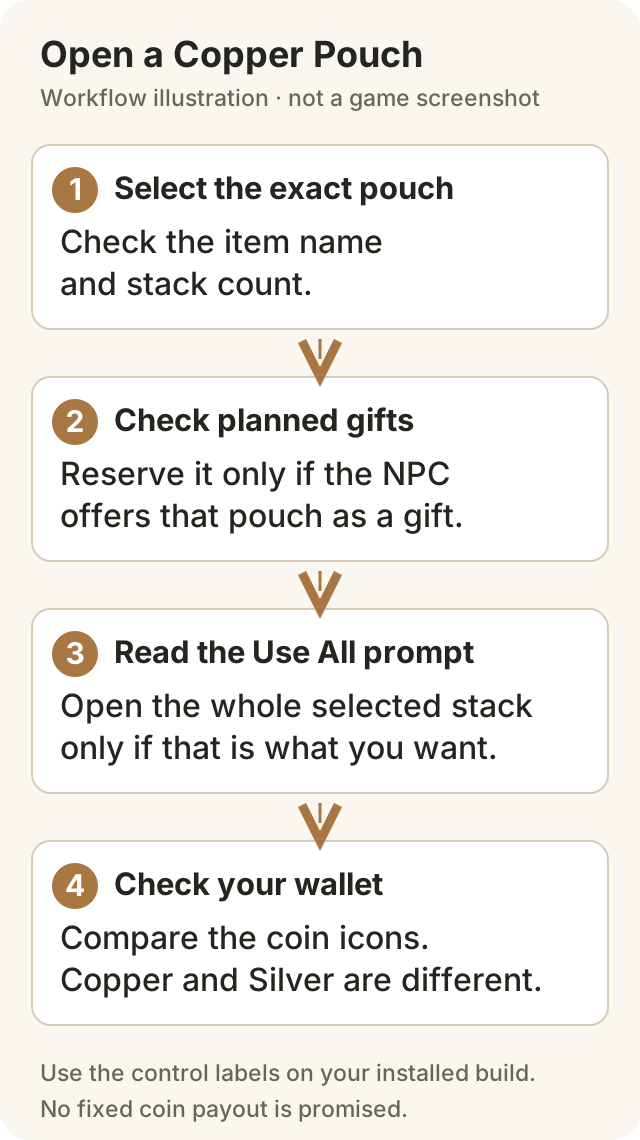
Original workflow illustration, not a game screenshot. The steps describe the decision to make; they do not reproduce the game's menu layout.
What Are Copper Pouches in Crimson Desert?
They are pouch items you use through Inventory. Keep the item name separate from the currency amount shown in your wallet. A Copper Pouch and a Silver Pouch are different item labels; do not treat every money pouch as the same denomination or value.
What Should You Do With Copper Pouches?
| What you need | What to do |
|---|---|
| Spendable coins now | Use the pouch in Inventory and check the wallet result. |
| A specific NPC gift | Check that NPC's Gift list before opening a reserved stack. |
| Less inventory clutter | Open stacks you are ready to use; keep only a deliberate gift reserve. |
| A precise payout estimate | Check your item details and the before/after currency display; this page does not give a fixed pouch range. |
Copper or Silver? Read the Coin Unit
The Decent Copper Pouch tooltip in a PC Gamer inventory screenshot says it contains copper coins. That is not the same number of silver. The source page is dated March 20; the screenshot’s build is not identified, so use it as a historical item example rather than a current payout or sale test.
Read the denomination shown by your item details and wallet, and compare the same currency before and after use. If you are budgeting for a purchase, use the actual wallet total and the shop price instead of an assumed per-pouch silver amount.
Should You Gift Copper Pouches Instead? (Trust System)
For Light Copper Pouches, make the decision at the NPC:
- Open the target NPC's Gift interaction, if available.
- Check whether your pouch is offered in that NPC's list.
- Read any displayed Trust result and check the quantity before confirming.
- If the pouch is unavailable, keep it for another planned target or return to Inventory to open it.
A greyed-out item may be locked: 1.05.00 changed Sell and Gift lists to grey out locked items. Check the item state before interpreting a disabled entry as a permanent restriction.
Do not assume every NPC accepts the same gift, or that a fixed number of pouches reaches a particular reward. Keep only the stack you plan to give; bulk-opening it spends the item you were saving for that choice.
Before a wider cleanup, review the inventory protection checks for items you are keeping. Return to the NPC's Gift list and recheck the item state when you are ready to give the reserved pouch.
Copper Pouches and Inventory Space
Finish the opening action and then check the pouch entry. A partially used stack can remain in Inventory, so do not assume opening one item clears its whole slot. If your problem is storage rather than pouch use, see the Inventory Management Guide.
Quick Early-Game Recommendation
Check the pouch names you actually receive from loot or quest rewards. After a run, decide which stacks you want to open and which, if any, you are keeping for a confirmed gift option. Open the spendable stacks, read the wallet result, and use that total for your next purchase.
There is no tested pouch-farming route or guaranteed drop rate supplied here. Avoid buying or farming a fixed pile solely because a guide says it always unlocks an NPC reward.
For your next town trip, the Hernand local commission loop gives you short errands to compare with the posters available in your save. Check each task's own reward rather than treating those errands as a pouch-farming route.
FAQ
What do you do with copper pouches in Crimson Desert?
Use them from your inventory to collect their coins. Check the selected pouch and Use All prompt before opening a whole stack. Reserve a Light Copper Pouch for gifting only if the target NPC offers it in their Gift list.
What are copper pouches used for in Crimson Desert?
The main use is opening the pouch from your inventory. For a planned gift, check whether that specific NPC accepts your pouch before using the stack. Check the stack quantity and coin type before use.
Can you sell copper pouches in Crimson Desert?
The historical Decent Copper Pouch tooltip shows Cannot Sell. Use Inventory to collect its contents. For another pouch variant, check its current tooltip and the merchant’s Sell list.
How do you open copper pouches in bulk in Crimson Desert?
Select the pouch stack and read its Use All prompt before activating it. Pearl Abyss made Use All the default choice for pouch-type items in patch 1.01.00. It applies to the selected stack, so check the quantity and any gifting plans first.
Should you gift copper pouches to NPCs in Crimson Desert?
Keep a Light Copper Pouch only when you have a specific NPC gift in mind and the NPC’s Gift list offers it. Check the displayed result and quantity before confirming rather than assuming every NPC accepts it or planning around a fixed pouch count.
What to Do Next
For a broader plan, read How to Make Money in Crimson Desert. For bag and storage decisions, use the Inventory Management Guide. The 1.01.00 patch overview explains the inventory changes that made Use All the default.
Change Record
October 3, 2026: updated the opening steps to the official Use All default and mouse controls; removed unverified payout, currency-conversion, fixed Trust, and universal gift/sale claims; made the Gift decision depend on the target NPC's menu; and synchronized the FAQ with this workflow. Original publication date: March 27, 2026.
Sources
- Pearl Abyss — 1.00.03, March 25: keyboard Inventory shortcut.
- Pearl Abyss — 1.01.00, March 29: inventory click controls and Use All default for pouches.
- Pearl Abyss — 1.05.00, May 2 revision: locked items greyed out in Sell/Gift lists.
- Pearl Abyss — 2.03.02, September 23: version reference for this review.
- PC Gamer — historical Decent Copper Pouch inventory screenshot, source page dated March 20: inspected item text identifies copper contents and Cannot Sell for that specific pouch.
Author

The shared editorial byline for sourced news, patch analysis, and site-wide research maintained by the Crimson Desert HQ team.
Editorial standards
We prioritize official sources, reproducible game evidence, and clearly labeled community reports. Found an error or missing attribution?
Read our editorial policyCategories
Table of Contents
More Guides
Crimson Desert Inventory: 240-Slot Cap & Storage
Increase inventory with expansion items, distinguish the 240-slot bag cap from 1,000-slot Private Storage, and find the right chest before selling loot.


Best Side Quests in Crimson Desert: Camp & Town Routes
Choose an available Crimson Desert side quest by your goal: town commissions, camp work or a faction detour. Check prerequisites and rewards before traveling.

Hernand Region Exploration Guide: What to Do Next
Choose your next Hernand route by story progress: town and bell, available commissions, Howling Hill, Scholastone, and optional quest detours.
Newsletter
Join the community
Subscribe to our newsletter for the latest news and updates