Crimson Desert Inventory: 240-Slot Cap & Storage
Increase inventory with expansion items, distinguish the 240-slot bag cap from 1,000-slot Private Storage, and find the right chest before selling loot.
Crimson Desert's documented personal inventory cap is 240 slots. Increase carried capacity with inventory expansion items; free existing space by moving reserves into storage. Private Storage can reach 1,000 slots through camp expansions, but those slots are separate from your bag. These are the two different limits that matter for inventory management. Official 1.01.00 notes, official 1.02.00 notes.
For storage you can reach early, check the Hernand temporary lodgings or Kliff's tent at Howling Hill Camp. For longer-term reserves, choose a housing chest that accepts the item type. Official storage locations, Howling Hill chest relocation.
Version scope: reviewed October 3, 2026, including the latest official 2.03.02 notice. This guide uses documented patch rules; bag locations and shop availability have not been retested in a new playthrough. Check the requirements shown in your save.
How Inventory Works in Crimson Desert
Read the inventory's used / maximum capacity counter before a loot run. Adding capacity and reducing occupied slots solve different problems: a bag changes the maximum, while transferring an item changes what you carry.
Do not plan around one stack size for every item. Patch 1.16.00 specifies different limits for unpackaged trade goods and explosives; earlier updates also changed which items can stack. Check the actual stack and capacity counter when moving or combining items. Official 1.16.00 notes.
At the documented 240-slot limit, additional expansion items obtained become boxes of materials and other items. Buying or chasing more expansions will not raise that published ceiling. Official 1.01.00 notes.
How to Increase Inventory in Crimson Desert
- Check your current maximum. If it is already 240, start with the storage section below.
- Inspect an expansion item's description. Read its effect and the available use prompt rather than relying on the bag's name alone.
- Check the offer or reward before committing. Compare the displayed price and purchase condition at a shop; inspect reward information in the Journal before choosing a quest route. Reward previews and shop purchase-condition displays were added in 1.04.00.
- Use the item, then reopen the inventory. Compare the maximum with the value you noted. If it did not increase, check whether you reached the cap and received a reward box instead.
Check Available Bags Before Committing to a Route
| Where you are checking | What to confirm | Next step |
|---|---|---|
| A shop's buy menu | An expansion item is actually in stock; its price and purchase condition suit your progress | Inspect it before buying |
| A quest in the Journal | The visible reward is an expansion item | Track that quest and follow its requirements |
| A bag you already obtained | Its description identifies an inventory expansion effect | Use it and compare capacity |
| A source that is unavailable in your save | Stock, reward or progression requirement does not match | Try another visible offer; free space through storage meanwhile |
This check prevents spending a long trip on a bag reward your save cannot yet access. A missing offer also does not establish a universal merchant refresh timer.
For a short town route to inspect before committing, follow the Hernand local commission loop and confirm its current reward preview. When choosing between a camp request and a town poster, use the side-quest planning guide to select a task, then check the actual reward in the Journal.
Storage Systems in Crimson Desert (Private, Wardrobe, Kuku & More)
Use the following table to choose a destination. Capacity is storage capacity, not extra carried slots.
| Storage | Slots and contents | Access |
|---|---|---|
| Private Storage | 240–1,000; reserves accepted by its transfer menu | Hernand lodgings / Howling Hill; expand the camp |
| Sturdy Gatherables Chest | 1,000; materials | Furniture shops; place through housing |
| Wardrobe | 100 each, 1,000 total; outfits | Furniture shops; place through housing |
| Collectibles Chest | 1,000; quest items and recipes | Quest reward; place through housing |
| Kuku Cooler / Enhanced Kuku Cooler | 40 / 330; food and ingredients | Quest reward / crafting; place through housing |
The specialist capacities and acquisition types are documented in official 1.04.00 notes. The notes do not name the cooler/chest quest or give a universal furniture price; use your Journal, shop offer and crafting recipe for those requirements.
Private Storage (added in patch 1.00.03, expanded in 1.02.00)
At Howling Hill, look inside Kliff's tent, rather than behind Karl. Interact with the chest, select reserves and use the transfer prompt shown by your control preset. The bulk Store all selected items function was added in 1.01.00. Review your selection before confirming and check that the bag's occupied count falls.
The camp-linked capacity progression is explicit in 1.02.00:
| Completed camp expansions | Private Storage slots |
|---|---|
| None | 240 |
| First | 340 |
| Second | 440 |
| Third | 540 |
| Fourth | 640 |
| Final, fifth expansion | 1,000 |
These are five completed expansions, not a claim that every camp navigation label uses the same numbering. Follow the camp upgrade guide and check the chest counter after the mission completes.
Sturdy Gatherables Chest (1.04.00)
Stored materials can supply crafting and refinement without being carried. This makes it a useful home for reserves you want to preserve for upgrades.
Wardrobe (1.04.00)
Put spare outfits here to separate them from your travel loadout. Retrieve what you need before leaving; do not assume outfit storage has the same remote-use behavior as material storage.
Collectibles Chest (1.04.00)
Use its accepted-item list to put aside documents you are preserving. Keep an item needed for the current quest step accessible until you have checked that step's requirements.
Kuku Cooler / Enhanced Kuku Cooler (1.04.00)
Stored ingredients can supply cooking without being carried. Keep the meals you intend to consume on your next outing in your bag. The remote-material and remote-ingredient rules above are specified in 1.04.00.
Place a Housing Chest and Check the Transfer
- Obtain the storage item through the source in the table. If it requires crafting, check the recipe's ingredients and requirements first.
- Enter housing mode at your available home, select the item and place it where you can interact with it.
- Leave placement mode, open the container and inspect which items it accepts.
- Transfer a small selection first. Reopen the bag to confirm that space was freed, then move the remaining reserves.
After the camp moves to Pailune, the official notes specify a placeable Private Storage item. Do not confuse that later housing item with the earlier fixed chest at Howling Hill. Official 1.04.00 notes.
Using Inventory Category Tabs (Update 1.04.00)
Choose All, Documents, Equipment, Food, Materials or Others, then sort the category you are reviewing. Sort preferences persist separately across restarts. Official 1.04.00 notes.
Work through one category at a time when selecting transfers or sales. A filter hides other categories; grouping changes the display. Check the capacity counter for the actual result instead of counting visible tiles. Follow the prompts for your input preset rather than assuming a fixed keyboard shortcut.
What to Keep and What to Sell
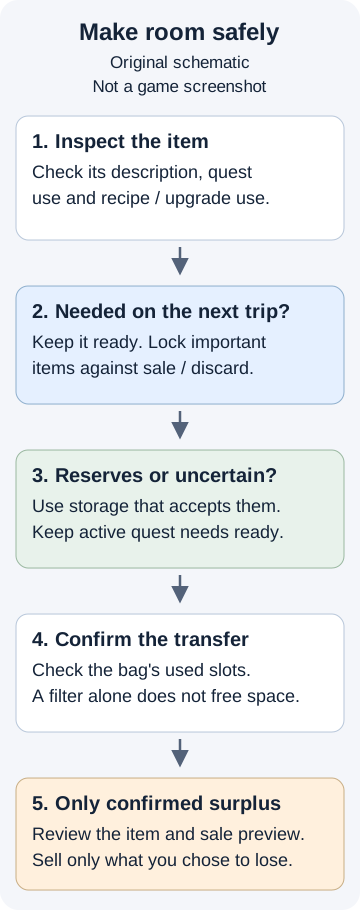
Original decision-flow illustration, not a game screenshot. Apply it before a bulk transfer or sale.
Protect What You Need Next
Keep your chosen equipment, tools and planned consumables ready for the next trip. Preserve active quest items and materials needed for a specific recipe or upgrade. Use Lock on items you want protected from sale or discard; this protection is documented in 1.04.00.
For Abyss Artifacts and Faded Abyss Artifacts, check the item's current description and the relevant skill menu before using or selling anything. The Abyss Artifacts guide is the next place to compare their uses; keep what your planned skill changes require.
Choose quantities for the outing you are planning. There is no reason to consume upgrade materials or turn every ingredient into a meal merely to tidy the menu.
Read, Then Check the Item's Remaining Purpose
Read an unread document when its prompt allows it, then check the item description and relevant quest. Learning its information does not by itself prove that the physical item is safe to discard. Store uncertain documents that the Collectibles Chest accepts instead of treating the entire Documents tab as junk.
Sell Only Confirmed Surplus
Before selling, ask three questions: Do I need it for a quest? Is it a recipe or refinement input? Do I want it for another loadout? If any answer is unresolved, put it aside.
Duplicates deserve a smithy check: identical equipment can be used for refinement under the conditions in 1.06.00. For equipment you already refined, inspect Extraction before selling; it recovers some invested materials and lowers refinement without destroying the equipment. Check the preview for the specific item and materials.
Patch 1.11.00 also introduced shop resale of lost rare equipment. That recovery feature is not a reason to dispose of an item you still need, and it is not a blanket promise to recover quest documents.
Special-case: Trade Goods and Copper Pouches
For trade goods, open the map's Trade tab and compare trading-post details before choosing where to sell. Prices can change when too much is sold at one location; the expanded system in 1.16.00 makes a single "sell everything here" rule unreliable.
For pouches, read the use prompt and selected quantity before confirming. Use All became the default pouch option in 1.01.00, so a bulk action may use more than the single item you intended.
If you are deciding what to do with a particular Copper Pouch, continue to the Copper Pouches guide and compare the actions available for that item in your save.
Think Before Selling
If the item's purpose is unclear, leave it out of the sale selection. Check the active quest and relevant crafting/refinement preview, then store it if the appropriate chest accepts it. Merchant acceptance establishes that an item can be sold; it does not establish that you will never need it again.
Inventory Management Tips
| Problem | Check first | Practical action |
|---|---|---|
| Inventory full below the cap | Current maximum; any expansion item already owned | Use an available expansion or transfer reserves |
| Inventory full at 240 | Which carried items are needed for the next activity | Move reserves to an appropriate chest |
| Material pile taking up space | Planned recipe/refinement inputs | Preserve useful reserves; craft only the upgrade you want |
| Housing container will not accept an item | The container's accepted-item list and available transfer prompt | Try an appropriate storage type; keep it if uncertain |
| Camp expanded but storage looks unchanged | Expansion mission completion and chest capacity | Reopen the chest and verify the counter before assuming a new limit |
| A sellable document has an unclear purpose | Item description and current quest | Keep it out of bulk sales |
Quick Inventory Routine
Before your next outing:
- Record free space. Open the bag and read its counter.
- Protect the next trip's items. Check the active quest, loadout and consumables; lock important items.
- Transfer reserves. Use the container that accepts them, then confirm the occupied count changed.
- Check surplus individually. Review quest, recipe and refinement uses before a sale.
- Recheck the bag. Leave room for the loot you expect and make sure you still carry what the next activity needs.
Frequently Asked Questions
How do I increase inventory in Crimson Desert?
Use inventory expansion items and check the capacity counter afterward. Inspect each item's description or the Journal reward preview before spending currency or pursuing a bag. Pearl Abyss documents a 240-slot personal inventory cap; expansion items obtained after that limit award material and item boxes instead.
Does Crimson Desert have a storage system?
Yes. Private Storage is available at the Hernand temporary lodgings and Howling Hill Camp, where the chest was moved into Kliff's tent. Camp expansions increase its capacity from 240 to 1,000 slots. Housing also supports specialist storage for materials, outfits, quest items and recipes, and food. Storage capacity does not increase your carried inventory limit.
How do inventory category tabs work in Crimson Desert?
Filter the inventory with All, Documents, Equipment, Food, Materials or Others. Each category retains its own sort setting across restarts. Filters and grouped icons organize the display; use the capacity counter to check whether you actually freed a slot.
What should I sell from my inventory in Crimson Desert?
Sell only items you have checked against active quests, recipes, refinement needs and your next trip. Lock important items, store uncertain reserves, and inspect the sale preview. A duplicate weapon or a read document is not automatically disposable; compare trade-good prices through the map's Trade tab.
Related Guides
- Camp upgrades and expansion missions — follow the expansion workflow behind Private Storage capacity.
- Crafting, smithing and refinement — inspect upgrade requirements before selling potential inputs.
- Cooking and food — plan meals for the next outing.
- Copper Pouches — compare the use options before a bulk action.
- Abyss Artifacts — check ordinary and Faded artifact uses before clearing skill-related items.
Change Log
October 3, 2026: separated the 240-slot bag limit from camp-linked storage; added storage destinations and a cleanup flow; removed unverified bag prices, reward milestones and respawn timers; replaced blanket document/duplicate sales advice with item checks and Lock; updated trading guidance against 1.16.00. Original publication date and page URL retained.
Author

An editorial pen name used for gameplay walkthroughs tested or researched by the Crimson Desert HQ team; it is not the in-game character or a Pearl Abyss representative.
Editorial standards
We prioritize official sources, reproducible game evidence, and clearly labeled community reports. Found an error or missing attribution?
Read our editorial policyCategories
Table of Contents
More Guides

Crimson Desert Copper Pouches: How to Use & Open All
Use Copper Pouches for coins, open stacks with Use All, and check whether an NPC accepts a Light Copper Pouch before gifting.


Crimson Desert Camp Upgrade Guide: Levels 1-5, Materials & Unlocks
Follow the Camp Expansion route through Levels 1-5, check your live material and recruit requirements, and troubleshoot a missing Level 4 mission.

Crimson Desert Abyss Artifacts: Faded Uses & Skill Reset
Use Faded Abyss Artifacts in Skills, claim Sealed challenge rewards, and check the character-specific reset rules introduced in patch 2.00.00.

Newsletter
Join the community
Subscribe to our newsletter for the latest news and updates