
Crimson Desert Camp Upgrade Guide: Levels 1-5, Materials & Unlocks
Follow the Camp Expansion route through Levels 1-5, check your live material and recruit requirements, and troubleshoot a missing Level 4 mission.
To upgrade your camp, unlock its next Camp Expansion through the main quest or Greymane faction objectives, then dispatch that project from Howling Hill's mission panel. Check the required members, skills, resources, and Task Time before starting. If Level 4 is missing, work through the unfinished Greymane objective first; stockpiling materials alone does not establish that you have unlocked the mission.
Version scope — updated October 3, 2026: the screen examples below come from March 2026, not a new playthrough on the current patch. They explain the interface; use your installed version's task panel for exact costs and timers. The September 23 hotfix notice, 2.03.02, lists most platforms as available, with Mac App Store still pending when checked.
For the next part of your upgrade:
- Dispatch Mission Guide — plan resource-producing assignments
- Inventory Management Guide — manage the gear and materials you keep
How Camp Upgrades Work in Crimson Desert
If you have not established Howling Hill, follow the camp objectives in your main quest journal first. After that, open the Greymane faction quests and track the next unfinished objective. Recruitment, resource-gathering tasks, and expansion projects are separate checks: having enough resources does not mean every later project is available.
If you are still moving between Hernand town and the camp, follow the Hernand town-to-camp route to resolve the next story objective before making a materials run.
This guide uses Level 1 for the starting camp and Levels 2–5 for the states after the first through fourth expansions. These are navigation labels, not a claim that the game ends at Level 5. Pearl Abyss describes five expansion stages, including a final expansion, in its 1.02.00 storage update.
Start an Expansion and Check Its Requirements
- Track the camp's current objective in the Journal and complete the steps it lists.
- Open the map, select Howling Hill, and choose Inspect. If the icon is hard to find, try the map's faction filter. Use the button prompt shown for your control preset.
- Open Mission List and select the available Camp Expansion. Confirm its expansion number; a farm, wagon, or other construction mission is a different project.
- Read Required Members, any required skills, every resource icon and amount, and Task Time. Check that the eligible members you need are available for selection.
- Add only the missing supplies, re-open the mission, select the eligible members, and confirm Dispatch.
- After starting, check the remaining timer. When it completes, return to the tracked objective and check the next Greymane tasks.
The map inspection and mission-selection route is visible in PC Gamer's March 25 game screenshots. Menu organization has changed since launch: patch 1.10.00 changed dispatch categories from regions to mission types. Follow your current menu labels rather than an old control diagram.
Read the mission's skill requirement before assigning your team. Pearl Abyss's 1.09.00 update puts comrades with the required skills first in the dispatch UI. Check the displayed result before spending extra members on the same project.
How to Upgrade Your Camp to Level 2
Find the first Camp Expansion among the Howling Hill objectives. Inspect the mission, cover its listed supplies, and assign the required eligible members. Return to the journal after completion so you can pick up the next camp objective.
PC Gamer's March 25 first-expansion screen shows 2 required members and 18 hours. Its costs appear as icons with 100 and 250. Read the corresponding resource labels in your panel before donating; a coin icon alone does not establish a cost in personal Silver.
How to Upgrade Your Camp to Level 3
Level 3 here is the state after the second Camp Expansion. Complete the first expansion, then follow the next unfinished Greymane objectives until the second expansion appears in Howling Hill's Mission List.
Before dispatching, use this checklist for the second expansion and every later one:
| Panel field | What to check | If you cannot start |
|---|---|---|
| Mission name | The expansion number matches the objective you are tracking | Finish the preceding objective; do not select an unrelated construction job |
| Required Members | Enough eligible members are available to select | Check members' current assignments and recruit through the available quest objectives |
| Required skills | Your selected team meets the displayed skill condition | Inspect the member skill entries rather than choosing by level alone |
| Resource costs | Each icon's required amount is covered by camp supplies | Recheck the donation preview or the output of an available resource mission |
| Task Time | The duration shown for this specific project | Plan around that timer, then check the remaining time after dispatch |
Before you gather materials, write down the shortfall for each resource shown in the second expansion's panel. Check it again after donating or completing a resource assignment, then dispatch when every condition is met.
Before committing members to another assignment, work through the dispatch mission setup checks, then return to the expansion's own requirements to keep its team and supplies available.
How to Upgrade Your Camp to Level 4
Level 4 here means completing the third Camp Expansion. If you cannot find it, check these conditions in order:
- Confirm that the second expansion has completed; check its timer and your tracked objective.
- Open Greymane faction quests and finish the next required recruitment, resource, or dispatch objective. A completed recruit conversation and a completed expansion are different milestones.
- Inspect Howling Hill's Mission List again. Select the third expansion and check its member and skill conditions before committing resources.
- Read every resource icon. If the panel requests Armaments or another supply category, use the matching donation preview or a mission that produces that category.
- Dispatch once all displayed conditions are met, then follow its own remaining timer.
Level 4: Historical Task-Panel Example
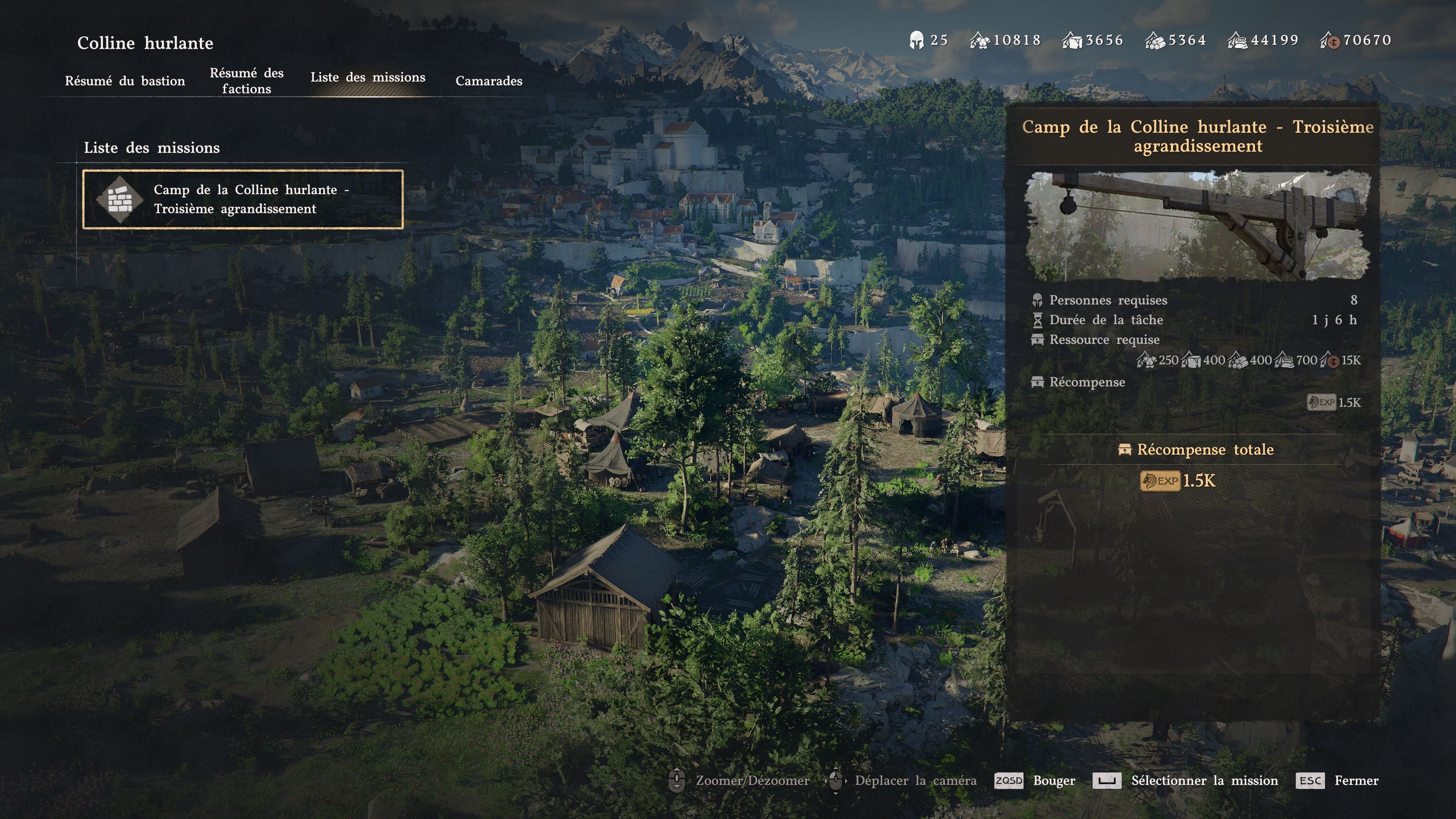
A game screenshot published by Millenium on March 23, 2026 shows the French mission “Troisième agrandissement” — third expansion. The original task-panel image displays:
| Field | What that March screenshot shows |
|---|---|
| Required members | 8 |
| Task time | 1 day 6 hours, equivalent to 30 hours |
| Five resource-icon amounts, left to right | 250 / 400 / 400 / 700 / 15K |
The resource numbers are attached to icons; the screen does not label the money value “Silver.” Match each icon to its label in your save before budgeting. The first-expansion and third-expansion screens also show different durations, so plan around Task Time, not a universal 17–18-hour estimate.
How to Upgrade Your Camp to Level 5
Level 5 here is the camp after the fourth Camp Expansion. Finish the third expansion and continue the remaining Greymane objectives until the fourth project is selectable. Repeat the panel checklist above and reserve enough camp supplies for that project before starting other assignments.
Budget Camp Funds separately from personal Silver. Patch 2.01.00 increased the funds received from Silver donations tenfold and fixed a discrepancy in camp donation mission requirements. That is a donation change, not a tenfold reduction of every expansion cost. Compare the donation preview with the funds shortfall before confirming.
Pailune and the Final Expansion
Camp progression continues beyond the four expansions covered by the Level 2–5 labels here. Do not confuse Pailune liberation, reconstruction tasks, and moving the camp as one automatic step.
Patch 1.03.00 discusses Pailune liberation in Chapter 7 and improvements to the camp there. Follow your journal's reconstruction and relocation objectives to determine your next step. See the Pailune Region Guide for that separate progression.
What Each Camp Level Unlocks
Private Storage and Housing
The clearest official expansion reward schedule is Private Storage. The totals below are calculated from the increments published in patch 1.02.00:
| Camp progress | Private Storage slots |
|---|---|
| Starting capacity | 240 |
| First expansion complete | 340 |
| Second expansion complete | 440 |
| Third expansion complete | 540 |
| Fourth expansion complete | 640 |
| Final expansion complete | 1,000 |
These are storage rewards, not resource costs. Patch 1.04.00 also confirms that selectable house types depend on camp expansion progress. It does not give a full level-by-level unlock table.
Farm and Ranch
Check the farm and ranch objectives that appear as you progress the Greymane quests. Complete the facility's own requested task before expecting it to work. Once available, inspect its planting or livestock menu before buying seeds or animals so you know what it can hold.
Wagons and Hot Air Balloons
Inspect wagon construction and Cloudcart crafting as separate missions, with their own materials and worker conditions. Select the transport project you actually need before funding it. The 1.04.00 notes confirm that Cloudcart crafting became a one-time mission and that the vehicle can be used as a permanent mount.
Blacksmith, Anvil and Grindstone
Use the service available at your camp for equipment work, and inspect its displayed options before spending refinement materials. Recruitment and camp expansion objectives may be separate. The Crafting and Smithing Guide covers equipment systems beyond camp construction.
Cooking Bonfire
Keep the ingredients and meals you need for your next outing before donating food. Check the recipes and equipment available at your camp's cooking station before converting the remaining ingredients into supplies.
Provisioner and Merchants
When a merchant or service is missing, check your outstanding Greymane recruitment and commission objectives. For housing storage, check the official 1.04.00 additions; the Merchant Trust Guide covers the separate vendor system.
Camp Resources — Where Each Material Comes From
Build a supply plan around the missing category on the next mission, rather than donating everything you own. At Carl's camp-supply menu, inspect the contribution preview before confirming a donation. Re-open the expansion panel afterward to check whether the shortfall has changed.
| Mission shortfall | Practical check before donating or dispatching |
|---|---|
| Food | Check accepted ingredients or meals and their contribution; keep food needed for your own trip |
| Timber or Stone | Check the contribution of spare gathering materials, or the listed output and input costs of an available resource mission |
| Armaments, if required | Preview the contribution of spare equipment; keep items you still need |
| Camp Funds | Compare the Silver donation preview with the exact funds shortfall; do not assume a one-to-one conversion |
Dispatch Missions — Your Primary Resource Source
Use the Dispatch Mission Guide to plan assignments, then compare each live mission's costs and rewards. Keep enough eligible members and supplies available for the expansion you intend to start.
Dispatch and Repeat Mission are separate choices, as introduced in patch 1.04.00. Check which you selected. Repeating missions consume their listed inputs, and patch 1.05.00 says dispatches automatically cancel when they can no longer be sustained. A repeat assignment is not guaranteed to run indefinitely.
Tips to Upgrade Your Camp Faster
- Track the next objective before gathering. Check whether your blocker is recruitment, a prerequisite task, an eligible team, or resources.
- Reserve your expansion team. Check current assignments before committing the members the construction mission needs to another job.
- Produce the resource you are short of. Compare mission inputs and outputs before selecting Repeat Mission.
- Use the donation preview. Protect rare crafting items and equipment you still use; donate only what closes the relevant shortfall.
- Read Task Time after selecting the project. If you rest to advance time, check the remaining mission timer afterward.
- Check Greymane Commissions separately. Read each request's actual reward and prioritize the one that helps your current goal.
If the Next Expansion Still Does Not Appear
Check your character and installed patch after checking prerequisites. Pearl Abyss's Known Issues notice, last updated September 21, 2026, lists Greymane faction quest progression problems while playing as Damiane or Oongka. Try progressing the objective as Kliff. That list predates hotfix 2.03.02, so it does not establish that every updated save is affected.
The same notice suggests restarting for some NPC interaction failures. That is a possible temporary workaround for an interaction problem, not a way to satisfy missing recruits, materials, or quest prerequisites.
Frequently Asked Questions
How do you upgrade your camp in Crimson Desert?
Follow the main quest's Howling Hill objectives and the available Greymane faction tasks. Inspect Howling Hill on the map, open Mission List, and select the unlocked Camp Expansion. Meet its displayed member, skill, and resource conditions, then dispatch.
How do you upgrade your camp to Level 3 in Crimson Desert?
Level 3 here means the camp after its second expansion. Complete the first expansion and the next required Greymane objectives, then dispatch the second expansion using the requirements displayed in your save.
How do you upgrade your camp to Level 4 in Crimson Desert?
Complete the third Camp Expansion. If it is missing, finish the next required Greymane recruitment or resource objective and inspect Howling Hill's Mission List again. Check members, skills, resources, and Task Time. The March screenshot's eight members and 30 hours are a historical example.
How do you upgrade your camp to Level 5 in Crimson Desert?
Level 5 here follows the fourth Camp Expansion. Finish the preceding objectives and meet its live mission requirements. Check the Silver donation preview instead of equating Silver with Camp Funds. Further camp progression includes a final expansion.
How long do camp upgrades take in Crimson Desert?
Check the specific mission's Task Time and remaining timer. March 2026 screens show 18 hours for the first expansion and 30 hours for the third; use your installed version's panel rather than a universal 17–18-hour estimate.
Revision Notes
October 3, 2026: clarified level numbering; added the Level 4 checklist and dated task-panel example; corrected the universal timing claim; replaced unsupported cost tables with checks for the live mission panel; added official storage rewards and donation changes; updated the FAQ.
Related Guides
Author

An editorial pen name used for gameplay walkthroughs tested or researched by the Crimson Desert HQ team; it is not the in-game character or a Pearl Abyss representative.
Editorial standards
We prioritize official sources, reproducible game evidence, and clearly labeled community reports. Found an error or missing attribution?
Read our editorial policyCategories
Table of Contents
More Guides
How Dispatch Missions Work in Crimson Desert
Start dispatch missions, check required members and supplies, read the task timer, and verify completion. Includes repeat missions and historical refunds.

Crimson Desert Inventory: 240-Slot Cap & Storage
Increase inventory with expansion items, distinguish the 240-slot bag cap from 1,000-slot Private Storage, and find the right chest before selling loot.

Best Side Quests in Crimson Desert: Camp & Town Routes
Choose an available Crimson Desert side quest by your goal: town commissions, camp work or a faction detour. Check prerequisites and rewards before traveling.
Newsletter
Join the community
Subscribe to our newsletter for the latest news and updates