
Crimson Desert Abyss Artifacts: Faded Uses & Skill Reset
Use Faded Abyss Artifacts in Skills, claim Sealed challenge rewards, and check the character-specific reset rules introduced in patch 2.00.00.
A Faded Abyss Artifact is for resetting skill progression. Open Skills, choose the character you want to rebuild, and review the reset confirmation before accepting. Check the item it will consume and the progression it will return. This menu route does not require an Eldertree visit.
Updated October 3, 2026: 2.00.00 changed skill resets to operate per character. The menu screenshots and Sealed walkthrough below are March examples; this revision does not include a fresh gameplay session on the current build.
Respeccing with Faded Abyss Artifacts
How to use one in Skills
- Check that the item you have is named Faded Abyss Artifact.
- Open Skills and select the character you intend to rebuild.
- Use the reset prompt. The inspected March screen labels it Reset All; follow the input shown for your preset.
- Read the confirmation's required item, refund, and character scope. Confirm only if that is the reset you want.
- Check the returned resources and reassign the selected character's progression.
The March 19 item and Skills screenshots were inspected directly. The tooltip identifies Skills as the place to reclaim investment. One confirmation consumes 1 Faded Artifact and returns 3 ordinary Artifacts for that particular build. Three is an example refund, not a fixed return for every reset. Check your current confirmation for the quantity required and returned.
What changed in 2.00.00?
Pearl Abyss's August 25 update introduced Abyss Link: spending Artifacts on one character's skills grants an equivalent quantity of Links to the other playable characters. Characters use their own Links, and resets refund the Links that character spent. Instructions that reset every character together predate this change.
The update also performed a one-time skill reset on the first launch after updating, returning previously spent skill resources. That migration is separate from choosing a new reset yourself. If you are returning to a pre-update save, inspect each character's resources and allocation before spending a Faded Artifact.
If the reset is unavailable
Read the disabled option or confirmation first. Compare its required item with what you have; an ordinary Artifact or a Sealed entry is a different resource. If the message identifies an inventory-space problem, address that stated blocker, then reopen Skills. Check the selected character and installed version when comparing your screen with an older example.
For that stated space problem, follow the inventory cleanup routine, protect the items you still need, and check the bag counter before trying the reset again.
To get another Faded item, check available challenge rewards for its full name before completing an objective. Inspect any available recipe or shop requirements in your save before buying ingredients.
What Are Abyss Artifacts?
The names identify different uses:
| Item | What to do with it | Where to check |
|---|---|---|
| Abyss Artifact | Spend on skill progression or a refinement step that requires it | Skills requirements or the selected equipment refinement |
| Sealed Abyss Artifact | Complete its challenge, then claim the available reward | Challenge details and its inventory entry |
| Faded Abyss Artifact | Reset a skill allocation | Skills reset confirmation |
Skill use is confirmed by 2.00.00; certain equipment refinement steps also use Artifacts, as documented in 1.06.00. A Faded reset item is not the ordinary Artifact payment for those upgrades.
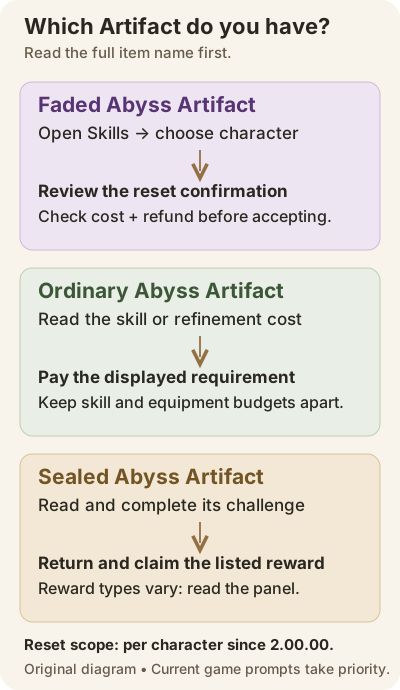
Original reference diagram, not a game screenshot. Current item requirements and button prompts take priority.
Sealed Artifacts: Complete the Challenge, Then Claim
Sean Martin's March 20 firsthand exploration report describes this route:
- Pick up a Sealed Abyss Artifact and find its challenge entry.
- Open Journal → Challenges. Read the objective, progress, and reward before starting.
- Complete the condition it actually names.
- Return to the inventory entry and use the available consume or reward-claim action. Follow your installed game's prompt.
The report describes claiming an ordinary Artifact after completing the challenge; some challenges also award Faded items or Abyss Gear. Check the reward list rather than assuming every challenge gives the same items.
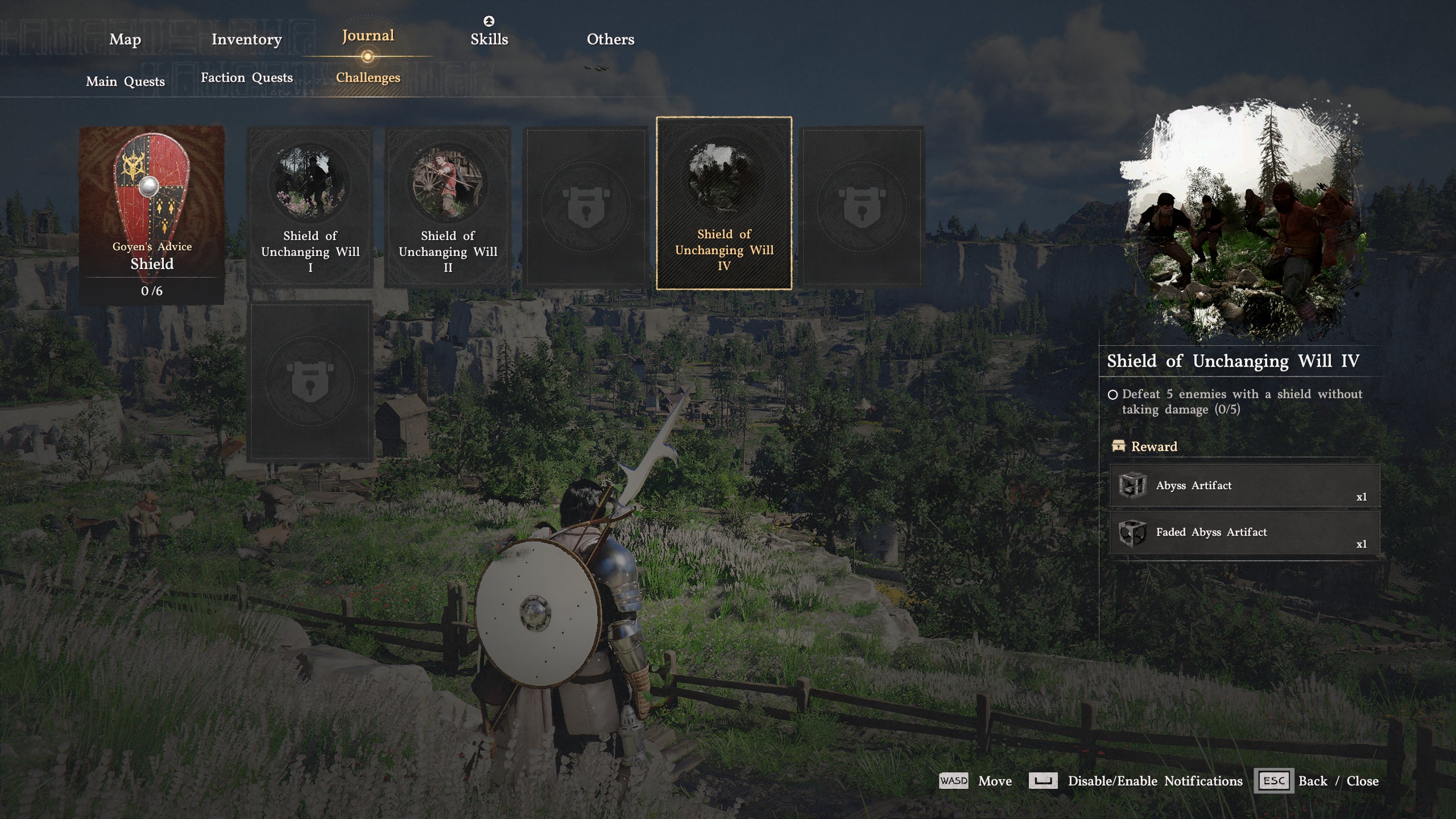
For a concrete task-panel example, the independently inspected March screenshot shows Shield of Unchanging Will IV: defeat five enemies with a shield without taking damage, with progress 0/5. Its reward panel lists 1 ordinary Artifact and 1 Faded Artifact. Those numbers belong to that example.
Abyss Artifacts vs Abyss Cores
Abyss Gear, called Abyss Cores in some older guides, belongs to the equipment socket system. Check the equipment's installed effects and available sockets when choosing a gear upgrade; this is separate from paying for skills or resetting them.
Check the selected equipment
Patch 1.06.00 notes that some equipment and Kuku equipment have fewer sockets than other items of the same type. Read the individual item's panel before budgeting socket additions.
For refinement, check the selected step's ordinary Artifact cost. The same update added Extraction at smithies, which reduces refinement without destroying the equipment. Special materials, including used Artifacts, are recovered at 100% under the published rules. Inspect the preview before choosing which refinement levels to undo. A Skills reset and equipment Extraction are different operations.
How to Get More Artifacts
Start with Journal → Challenges and select an available objective with the Artifact type you need. For quests, bosses, and puzzles, read the actual reward or obtained-item notice before planning around a particular quantity. If you are testing a repeatable source, compare your balance before and after.
For a boss-related objective in Pailune, read the first-clear versus rematch guidance before planning reward collection. Choose the encounter for its displayed objective rather than assuming a repeat fight awards more Artifacts.
Additional sources confirmed by official updates
Pearl Abyss lists ordinary Artifacts among the Laughing Marionette claw machine rewards in 1.06.00. 1.10.00 lists them at the Marni Token Exchange for Pinball tokens from the inn near the Delesyian Institute, and among Orb Roll rewards at the Great Gate of Urdavah.
Check the live reward list and entry or exchange costs before choosing an activity.
Choose What to Spend Your Artifacts On
Before buying a node, check its weapon, prerequisite, resource, and input. Pick an ability that addresses a problem you currently have, then practice it before buying several more nodes. If you are rebuilding, note which effects you want to keep before using the reset confirmation.
Keep skill and equipment spending in separate budgets. Preview the next refinement requirement before committing the ordinary Artifacts needed for an ability you want.
Watch and Learn System
Observation is another skill-learning route. Patch 1.04.00 says observing a skill already learned with Artifacts can return Artifacts. Check the learned skill and resource balance afterward; no fixed refund is promised here.
Frequently Asked Questions
What are Faded Abyss Artifacts used for?
Faded Abyss Artifacts are used for a skill reset, letting you reclaim invested progression and rebuild. Open Skills, select the character, and review the required item and refund before confirming.
Where do I use a Faded Abyss Artifact?
Use the reset option in Skills. The inspected March screen calls it Reset All; patch 2.00.00 changed resets to operate separately for each character. Follow your installed game's button prompt.
How do I use a Sealed Abyss Artifact?
Find its challenge, complete the displayed condition, then return to the inventory entry and use the available reward-claim action. Check the listed rewards: ordinary and Faded Artifacts have different purposes. This route comes from a March gameplay report; current prompts may differ.
Does a skill reset affect every character?
Patch 2.00.00 changed skill resets from all characters together to individual characters. It also introduced character-specific Abyss Links, which are refunded when that character's skill progression is reset.
How many Abyss Artifacts do I need to max every skill?
Select the character in Skills, check its ordinary Artifact and Abyss Link balances, and add the displayed costs of the nodes you still want. Meet their unlock conditions before buying. A Sealed Artifact collectible count is not the cost to maximize skills.
Revision Notes
October 3, 2026: added the Faded reset route, character-specific reset and Abyss Link changes, dated item/confirmation/challenge examples, and the distinction between ordinary, Sealed, and Faded items. Removed unsupported fixed totals, farm guarantees, socket costs, crafting requirements, and respec-service claims. Original publication date retained.
Related Guides
Sources
- Pearl Abyss — 2.00.00, August 25, 2026: Abyss Link, per-character resets, and the one-time skill migration.
- Pearl Abyss — 1.04.00, April 23, revised April 27: observation recovery.
- Pearl Abyss — 1.06.00, May 11, 2026: sockets, refinement, Extraction, and claw machine rewards.
- Pearl Abyss — 1.10.00, June 5, 2026: Pinball token exchange and Orb Roll rewards.
- PC Gamer / Sean Martin — respec, March 19, 2026: directly inspected historical game screenshots.
- PC Gamer / Sean Martin — Sealed Artifacts, March 20, 2026: the author's firsthand exploration and challenge-claim route; not a current complete map.
Author

An editorial pen name used for equipment and beginner guides researched by the Crimson Desert HQ team; it is not a Pearl Abyss representative.
Editorial standards
We prioritize official sources, reproducible game evidence, and clearly labeled community reports. Found an error or missing attribution?
Read our editorial policyCategories
Table of Contents
More Guides
Crimson Desert Inventory: 240-Slot Cap & Storage
Increase inventory with expansion items, distinguish the 240-slot bag cap from 1,000-slot Private Storage, and find the right chest before selling loot.


Pailune Bosses in Crimson Desert: Routes & Rematches
Find Priscus at the Spire of Ringing Truth, locate defeated bosses through Memory Fragments, and check Titan's boots unlock. Route and version limits included.

Best Side Quests in Crimson Desert: Camp & Town Routes
Choose an available Crimson Desert side quest by your goal: town commissions, camp work or a faction detour. Check prerequisites and rewards before traveling.
Newsletter
Join the community
Subscribe to our newsletter for the latest news and updates