How to Report Bugs in Crimson Desert With PERS
Pearl Abyss wants PC players to use PERS when a bug survives the normal troubleshooting steps. Here is when to use it, where to find it, and what to send.
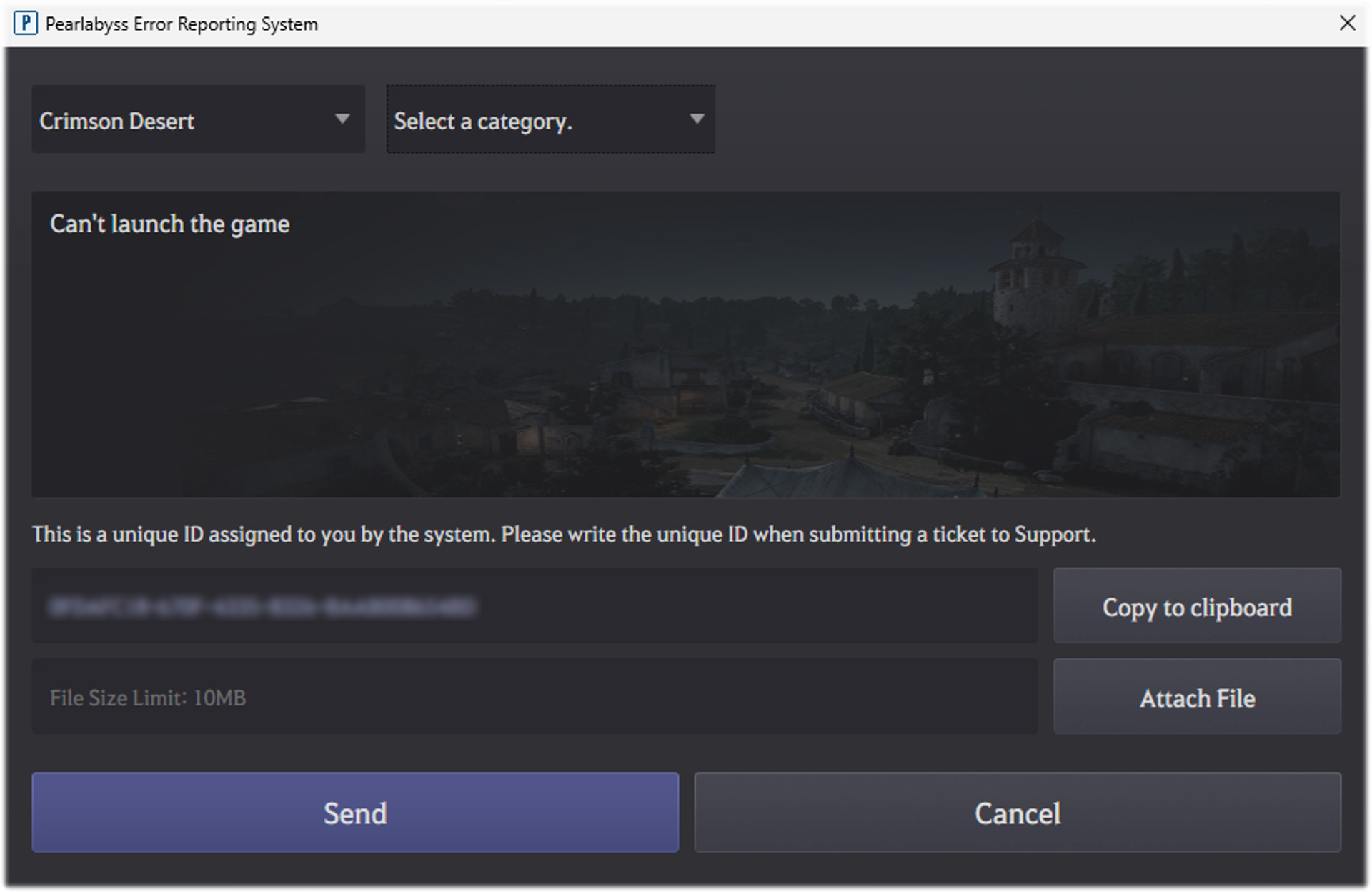
If a Crimson Desert bug survives the basic troubleshooting steps, Pearl Abyss wants PC players to use PERS, the Pearl Abyss Error Reporting System. The official support page says PERS can automatically send error dumps, logs, in-game screenshots, save data, and your hardware specifications.
That is why this tool matters. It is not just another support form. It is the official PC reporting path Pearl Abyss prefers once you have already checked the FAQ, the known-issues notice, and the latest patch notes.
When you should use PERS
Pearl Abyss does not tell players to report every problem immediately.
The official order is:
- check
Known Issues - check the
FAQ - make sure the game is updated
- try the relevant local troubleshooting steps
- if the issue persists, submit a report
So PERS is for bugs that survive the first pass, not the first thing you do before reading anything else.
Why PERS is better than a vague text report
The official support page highlights the big advantage of PERS: it automatically packages technical material that support actually needs.
According to Pearl Abyss, PERS can send:
- error dumps
- logs
- in-game screenshots
- save data
- hardware specifications
That gives your report more value than a message that only says "the game broke."
What kind of information you should still write yourself
Even with PERS, Pearl Abyss still wants a detailed written report.
The support page asks for:
- a detailed description of the issue
- the quest name or location if relevant
- whether the issue happens consistently or only occasionally
- reproduction steps, if the issue is repeatable
- what troubleshooting you already tried
That last point matters. If support can see that you already updated, verified files, or tested different save files, your report becomes much easier to triage.
How to open PERS on Steam
Pearl Abyss' official instructions say:
- open
Steam - go to
Library - right-click
Crimson Desert - choose
Properties - open
Installed Files - click
Browse... - go to the
bin64folder - run
PERS.exe
That is the official Steam path.
How to open PERS on Epic Games Store
For Epic, Pearl Abyss says to:
- go to the
Crimson Desert\\bin64folder - open it from the Epic install directory
- run
PERS.exe
The notice gives the standard Epic install path as:
C:\Program Files\Epic Games
What to do before you report
PERS is best used after the normal support checks, not before them.
That means you should usually:
- update the game
- verify files if the bug looks like corruption, crashes, or broken visuals
- update GPU drivers
- rule out interference from background software
- back up saves before any clean-install attempt
If you skip all of that, your PERS report may still go through, but it will be weaker and slower to diagnose.
What kinds of bugs benefit most from PERS
PERS is especially useful for:
- crashes
- reproducible quest bugs
- launch failures
- save-related problems
- graphics or performance issues that survive file verification
It is also valuable when the problem happens in a very specific place or state, because then the attached save and logs become much more useful.
Is PERS the same thing as the Report an Issue page?
Not exactly.
The Report an Issue notice is the support hub. It tells you:
- what to check first
- what troubleshooting steps to try
- when to escalate
PERS is the PC tool Pearl Abyss wants you to use during that escalation because it sends the technical files automatically.
So the clean reading is:
- the support page gives the process
- PERS is the preferred PC evidence bundle
What about console and Mac players?
The strongest PERS wording on the official notice is specifically for PC.
That means if you are on console or Mac:
- still follow the same general support flow
- still gather detailed reproduction information
- but do not assume you will use the exact same PERS path the PC notice describes
If you are on PC through Steam or Epic, though, PERS is clearly the intended route.
How to write a better bug report
A strong PERS report is specific, short, and reproducible.
Good details include:
- exact quest name
- exact area or encounter
- what you were doing immediately before the bug
- whether it happens every time
- whether you already reloaded, verified files, or updated
Bad reports are usually vague and emotional. Good reports are mechanical.
FAQ
What does PERS send in Crimson Desert?
Pearl Abyss says PERS can automatically send error dumps, logs, in-game screenshots, save data, and hardware specifications.
Where is PERS located?
On PC, Pearl Abyss says to open the game's bin64 folder and run PERS.exe.
Should I use PERS before checking Known Issues?
No. Pearl Abyss wants players to check Known Issues, the FAQ, and the latest patch status first.
Is PERS only for crashes?
No. It is useful for many persistent PC issues, especially when logs, saves, and hardware information help reproduce the problem.
What to do next
Use PERS after the normal checks, not instead of them. Crimson Desert Known Issues and Best Workarounds should be your first stop, How to Verify Game Files and Do a Clean Install for Crimson Desert covers the official local troubleshooting path, and How to Fix Crimson Desert Not Launching on the Xbox PC App is the right targeted guide if your issue is specifically the Microsoft storefront build.
더 많은 가이드

Crimson Desert Enhanced Raytracing on PS5 and Xbox Series X Explained
Patch 1.03.00 adds Enhanced Raytracing for PlayStation 5 base and Xbox Series X, plus related lighting and reflection improvements across platforms.


Crimson Desert Known Issues April 14, 2026 Workarounds
The known-issues notice was updated on April 14, 2026. Here are the active problems to watch and the safest temporary workarounds.

Crimson Desert Private Storage Guide After Patch 1.00.03
Patch 1.00.03 finally added Private Storage to Crimson Desert. Here is where it is, how it changes your inventory loop, and what it still does not replace.
Newsletter
Join the community
Subscribe to our newsletter for the latest news and updates